A cracked or dead MacBook screen does not mean the laptop is finished. In most cases the display assembly can be replaced and the rest of the machine is untouched.
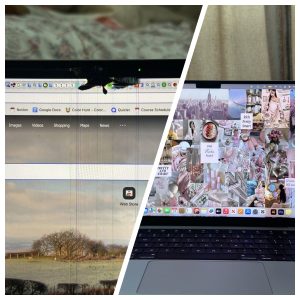
Before and after a MacBook screen replacement: vertical lines across the damaged panel on the left, the new display on the right.
MacBook screen replacement starts at $200, and the inspection is free. The exact price depends on your model, because a 13-inch Air panel and a 16-inch Pro panel are very different parts. Speed Fix Mobile is a walk-in shop at 94 Hester St Front 1, New York, NY 10002.
When a MacBook Needs a Screen Replacement
Cracked or shattered glass, with or without visible display damage
Black screen while the laptop still powers on and makes sound
Vertical or horizontal lines across the display
A dark band along the bottom of the screen (often called flexgate on some models)
Backlight works but the image is missing, or the image is there but very dim
Flickering that changes when you open or close the lid
Dead pixels, blotches, or pressure marks
The lid does not sit flush after a drop
Screen, Cable, or Logic Board?
Not every display problem is the screen itself. Three different parts can produce the same black screen, and they cost very different amounts to fix.
The display panel. Cracks, blotches, and dead areas point here.
The display cable. Flickering that changes with the lid angle, or a dark band at the bottom, often points at the cable rather than the panel.
The logic board or graphics. If an external monitor also shows nothing, the problem may be further inside the machine.
Try an external monitor before you bring it in. If a second screen shows a normal desktop, the laptop is working and the built-in display is the problem. If the external screen is also blank, tell us — that changes what we look at first.
What the Repair Involves
Free inspection. We open the laptop, check the panel, the display cable, and the board, and confirm what is actually failing.
Quote. You get the price for your specific model before any work starts.
Replacement. The display assembly is replaced and the hinges and cable routing are set correctly.
Testing. We check brightness, the full panel for dead areas, the camera, and the lid sensor before you pick it up.
Bring the charger if you have it. It helps us test the machine under load.
Price
MacBook screen replacement starts at $200. The final price depends on the model and on whether the cable or other parts also need attention. We confirm the price after the inspection, and the inspection is free whether or not you go ahead.
See our MacBook repair pricing for current posted prices, including motherboard repair from $100.
Your Data
A screen replacement does not touch the drive, and we do not need your password for the repair itself. Back up to Time Machine or iCloud before any repair anyway — that is good practice on a machine that already has a fault.
If we need to log in to test the display fully, we will ask you first and you can be there for it.
Bringing Your MacBook In
We are at 94 Hester St Front 1, New York, NY 10002, open Monday through Sunday, 10:00 am to 5:30 pm. Walk-ins are welcome.
Texting first is faster. Send a photo of the screen and tell us the model — it is on the bottom case, starting with an A followed by four digits — and we can check the part before you carry a laptop across town.
Frequently Asked Questions
How much does MacBook screen replacement cost in NYC?
It starts at $200 and depends on your model. A 13-inch Air panel costs less than a 16-inch Pro panel. Send us the model number and a photo and we will give you the price for your machine. The inspection is free.
How long does it take?
It depends on the model and whether we have the panel in stock. Some are same-day, others need the part ordered. Call or text before visiting and we will tell you what to expect for yours.
My MacBook screen is black but it still turns on. Is that the screen?
Maybe. Plug in an external monitor. If the external screen works normally, the built-in display or its cable is the problem. If nothing appears there either, it is likely deeper in the machine, and we will find out during the inspection.
Do I lose my files?
Screen work does not involve erasing the drive. We still recommend a Time Machine or iCloud backup before any repair, on any laptop.
Can you just replace the glass instead of the whole screen?
On modern MacBooks the panel and glass are bonded into one display assembly, so the assembly is replaced as a unit. We will tell you what your specific model needs during the inspection.
Where do I find my model number?
Turn the laptop over. The bottom case has a model number starting with A followed by four digits, such as A2441. You can also click the Apple menu and choose About This Mac.
Get a Quote for Your MacBook
Send a photo of the screen and your model number. We will tell you the price and whether we have the panel.
Your console powers on, the fan spins, the light comes on — but the TV says No Signal. In many cases the HDMI port on the console is the problem, not the TV and not the cable.
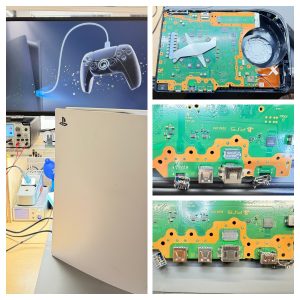
A PS5 on our repair bench next to a PS5 motherboard showing the HDMI and USB port area we inspect and repair.
We repair PS5 and Xbox HDMI ports for $90, and the inspection is free. If we open your console and find the damage is something we do not repair, you pay nothing. Speed Fix Mobile is a walk-in shop at 94 Hester St Front 1, New York, NY 10002.
Signs the HDMI Port Is the Problem
Console powers on and makes noise, but the screen stays black
The TV reports no signal on the input the console is plugged into
Picture flickers, cuts out, or only appears if you hold the cable at an angle
The HDMI cable feels loose or wobbly in the console
You can see bent or missing pins inside the port
The port looks pushed in or crooked compared to when it was new
A knocked cable is the usual cause. Someone trips over it, or the console gets moved while it is still plugged in, and the port takes the force.
Check These Three Things First
Rule out the easy causes before you carry a console across town. It takes five minutes.
Try a different HDMI cable. Cables fail more often than people expect.
Try a different port on the TV, or a different TV. This tells you whether the TV input is dead.
Look inside the console port with a flashlight. Compare the pins to the port on your TV. Bent, flattened, or missing pins point to the console.
If a different cable and a different TV both give you no signal, the console side is the likely problem. That is what we inspect.
What the Repair Involves
The HDMI port is soldered directly to the console main board. It is not a plug-in part, so replacing it is board-level work.
Free inspection. We open the console and check the port, the pads underneath it, and the surrounding board.
Quote. You get the price and what we found before any work starts.
Port replacement. The damaged port is removed and a new one is soldered in under a microscope.
Testing. We connect the console to a display and confirm video output before you pick it up.
When It Is Not the Port
We want to be straight with you about this, because it decides whether we can help.
The HDMI signal passes through a chip on the board before it reaches the port. If that chip is damaged — sometimes by the same impact that bent the port — replacing the port will not bring the picture back. We do not take on chip-level HDMI repairs. If that is what your console needs, we will tell you what we found and hand it back.
The inspection is free, so if it turns out to be the chip, you have not paid anything and you know what is actually wrong with your console.
Price
Our posted price is $90 for HDMI port replacement, on PS5 and on Xbox. Inspection is free whether or not you go ahead with the repair.
We are at 94 Hester St Front 1, New York, NY 10002, open Monday through Sunday, 10:00 am to 5:30 pm. Walk-ins are welcome.
Bring the console itself. You do not need the controller, the stand, or the cables unless you want us to test with them.
Texting first helps. Send a photo of the HDMI port and tell us what the TV does, and we can tell you whether it sounds like a port issue before you make the trip.
Frequently Asked Questions
How much does PS5 HDMI port repair cost?
$90 for the port replacement. The inspection is free, so if we find the console needs something we do not repair, there is no charge.
Is Xbox the same price?
Yes. HDMI port replacement is $90 on Xbox as well as PS5.
How long does it take?
About an hour of work once we start, when we have the part in stock. Call or text before visiting and we will tell you the current turnaround.
Will I lose my games or save data?
HDMI port work is done on the board and does not involve wiping the drive. We still recommend backing up saves to cloud storage or a USB drive before any repair, on any console.
My console has no signal but the port looks fine. Can you still check it?
Yes, bring it in. A port can be damaged internally without looking wrong from the outside. The inspection is free, so it costs you nothing to find out.
What if the problem is the HDMI chip?
We do not repair the chip. We will tell you that is what we found so you can decide where to take it, and you will not be charged for the inspection.
Get a Quote for Your Console
Tell us what your TV shows and send a photo of the HDMI port. We will tell you what it looks like and whether we have the part.
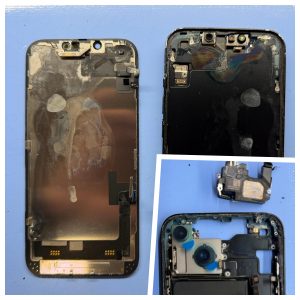
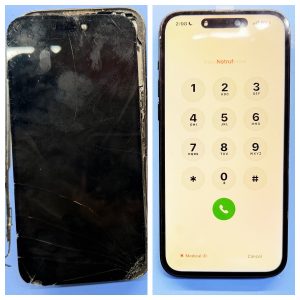
A badly cracked iPhone screen makes an everyday phone hard — and sometimes unsafe — to use. The photo below shows a real repair: on the left, glass shattered and lifting from the frame. On the right, the replacement screen installed and powered on.
Before-and-after view of a severely shattered iPhone screen and the powered-on replacement display.
Screen replacement starts at $50. Most models fall between $50 and $140, and the price depends on which iPhone you have. The full list is further down this page.
Speed Fix Mobile is a walk-in repair shop at 94 Hester St Front 1, New York, NY 10002. Call or text (929) 399-8485, or send a photo before you come in.
iPhone Screen Repair Prices
These are our posted prices for screen replacement. The final price is confirmed after we inspect the phone, since frame damage or other issues can change what the repair needs.
Damage like this can expose sharp glass. It also leaves the display open to pressure, dust, and moisture.
The right side shows the same phone after replacement. The display is on, the dialer is visible, and the screen sits evenly in the frame.
We cannot confirm the exact model from a photo alone. Tell us your model and what happened, and send a picture — that is enough to check likely parts before you make the trip.
Signs Your iPhone Screen Needs Repair
Bring the phone in if you notice any of these:
Cracked or missing glass, especially near corners or the earpiece
Sharp edges that catch your finger
Black spots, colored lines, flickering, or a dim display
Touch areas that do not respond
Ghost touch — the phone opens apps or types on its own
A screen lifting or separating from the frame
The phone rings or vibrates but shows no image
Display problems that started after a drop
A lifting screen needs prompt attention. Do not press it back down. Impact can separate the display, but internal pressure can cause it too, and that needs to be checked.
What Happens During the Repair
A screen replacement is more than swapping glass. Here is the sequence:
Inspection. We check the frame, connectors, and nearby components before quoting.
Quote and approval. You get the price and expected timing. Work starts only after you approve it.
Replacement. The damaged assembly comes out and the new screen goes in.
Testing. We check touch, brightness, camera, speaker, and charging before you pick it up.
Common screen repairs can often be finished the same day when the part is in stock. Call ahead and we will tell you whether yours is.
Why Not to Keep Using a Badly Broken Screen
Exposed glass edges can cut your finger
Gaps let in dust and moisture
Further pressure can turn a screen-only repair into a bigger one
A failing display can make the phone unusable without warning
iPhone Screen Repair in the Lower East Side
We are at 94 Hester St Front 1, New York, NY 10002, open Monday through Sunday, 10:00 am to 5:30 pm. Walk-ins are welcome.
Texting a photo first is faster. Include your model and whether the phone still powers on, and we can check parts and timing before you arrive.
Frequently Asked Questions
How much does iPhone screen repair cost in NYC?
Our screen replacement starts at $50. An iPhone 11 is $60, an iPhone 14 is $80, an iPhone 15 Pro is $105, and an iPhone 17 Pro Max is $140. See the full price list for your model. We confirm the final price after inspecting the phone.
How long does an iPhone screen replacement take?
Common screen repairs are often done the same day when the part is in stock. Timing depends on your model and the extent of the damage. Call or text before visiting and we will tell you what to expect for your device.
Can a badly cracked iPhone screen still be repaired?
Usually yes. Phones with severe visible damage can still be assessed for screen replacement. What the repair needs depends on the frame, connectors, and sensors underneath. The photo above shows why dramatic damage is worth having looked at rather than writing the phone off.
Should I back up my iPhone before screen repair?
Yes, if the screen still works. Make an iCloud or computer backup first. Screen work does not erase data by itself, but a backup protects your photos, contacts, and messages if the phone turns out to have other problems.
Get an iPhone Screen Repair Quote
Send us a photo of the damage and your model. We will tell you the price and whether we have the part.